
[vc_row bg_type=»image» parallax_style=»vcpb-default» bg_image_new=»id^10251|url^https://www.cursoswordpressmadrid.com/wp-content/uploads/2015/08/fondo-wordpress-profesional2-en-madrid-1.jpg|caption^null|alt^null|title^fondo-wordpress-profesional2-en-madrid|description^null» seperator_enable=»seperator_enable_value» seperator_type=»xlarge_triangle_seperator» seperator_position=»bottom_seperator» seperator_svg_height=»80″][vc_column][vc_empty_space height=»60px»][ultimate_heading main_heading=»NUEVO WORDPRESS PROFESIONAL 2″ main_heading_color=»#ffffff» heading_tag=»h1″ sub_heading_color=»#ffffff» main_heading_style=»font-weight:bold;» main_heading_font_size=»desktop:80px;tablet:60px;tablet_portrait:50px;mobile_landscape:50px;mobile:40px;» sub_heading_font_size=»desktop:24px;» sub_heading_margin=»margin-top:-5px;» main_heading_line_height=»desktop:80px;tablet:60px;tablet_portrait:50px;mobile_landscape:50px;mobile:40px;» margin_design_tab_text=»»]Crea tus proyectos de WordPress con todo el poder de VISUAL COMPOSER.[/ultimate_heading][vc_empty_space height=»90px»][vc_row_inner][vc_column_inner width=»1/3″][vc_single_image image=»9513″ img_size=»full» alignment=»center» css_animation=»left-to-right»][ultimate_heading main_heading=»1 Semana» main_heading_color=»rgba(242,242,242,0.85)» sub_heading_color=»rgba(242,242,242,0.86)» main_heading_margin=»margin-top:-20px;»]Las sesiones serán de 7 a 9pm durante una semana. Todas las clases estarán disponibles si no logras conectar algún día.[/ultimate_heading][/vc_column_inner][vc_column_inner width=»1/3″][vc_single_image image=»9512″ img_size=»full» alignment=»center» css_animation=»bottom-to-top»][ultimate_heading main_heading=»Presencial y Streaming» main_heading_color=»#ffffff» sub_heading_color=»#ffffff» main_heading_margin=»margin-top:-20px;»]Este curso será totalmente en streaming con la mejor tecnología en formación online. Disfruta del curso desde cualquier parte del mundo.[/ultimate_heading][/vc_column_inner][vc_column_inner animation=»bounce» width=»1/3″][ultimate_heading main_heading=»150€» main_heading_color=»#ffffff» main_heading_style=»font-weight:bold;» main_heading_font_size=»desktop:60px;»][/ultimate_heading][ult_createlink title=»Contáctanos» btn_link=»url:https%3A%2F%2Fwww.cursoswordpressmadrid.com%2Fcontacto%2F|||» link_hover_style=»Style_2″ text_color=»#000000″ text_hovercolor=»#2d2d2d» bghovercolor=»#eeee22″ title_font_size=»15″ css=».vc_custom_1497974350702{margin-top: 10px !important;padding-top: 10px !important;padding-right: 50px !important;padding-bottom: 10px !important;padding-left: 50px !important;}»][/vc_column_inner][/vc_row_inner][vc_empty_space height=»60px»][/vc_column][/vc_row][vc_row][vc_column animation=»fadeInUp» animation_delay=»0.3″][ultimate_spacer height=»80″][/vc_column][/vc_row][vc_row bg_type=»image» parallax_style=»vcpb-vz-jquery» bg_image_new=»9581|https://www.cursoswordpressmadrid.com/wp-content/uploads/2016/06/macbook-21.jpg»][vc_column animation=»fadeInUp» animation_delay=»0.3″][vc_empty_space height=»70px»][ultimate_heading main_heading=»Visual WordPress» main_heading_color=»#ffffff» sub_heading_color=»#ffffff» main_heading_style=»font-weight:bold;» main_heading_font_size=»desktop:25px;» sub_heading_font_size=»desktop:22px;» main_heading_margin=»margin-top:20px;»][/ultimate_heading][ultimate_heading main_heading=»¿Qué veremos?» main_heading_color=»#ffffff» sub_heading_color=»#ffffff» main_heading_style=»font-weight:bold;» main_heading_font_size=»desktop:100px;tablet:60px;tablet_portrait:60px;mobile_landscape:50px;mobile:40px;» sub_heading_font_size=»desktop:17px;» main_heading_margin=»margin-top:20px;» sub_heading_margin=»margin-bottom:20px;»]Conoceremos a fondo este gran maquetador visual y los principales plugin desarrollados específicamente para Visual Composer que harán realidad nuestros diseños para WordPress[/ultimate_heading][vc_empty_space height=»70px»][/vc_column][/vc_row][vc_row bg_type=»bg_color» seperator_enable=»seperator_enable_value» seperator_type=»xlarge_triangle_left_seperator» seperator_position=»bottom_seperator» seperator_svg_height=»100″ seperator_shape_background=»#ffffff» bgcolor=»#ffffff» bg_color_value=»#f9f9f9″][vc_column animation=»fadeInRight» width=»1/2″][vc_empty_space height=»60px»][ultimate_heading main_heading=»El mejor pack de recursos con las últimas tendencias de diseño web.» main_heading_color=»#2d2d2d» sub_heading_color=»#46bf3b» alignment=»left» spacer=»line_only» spacer_position=»middle» line_height=»2″ line_color=»#161616″ main_heading_font_size=»desktop:80px;tablet:60px;tablet_portrait:60px;mobile_landscape:40px;mobile:40px;» sub_heading_font_size=»desktop:24px;» main_heading_line_height=»desktop:80px;tablet:60px;tablet_portrait:60px;mobile_landscape:40px;mobile:40px;» sub_heading_style=»font-weight:bold;» sub_heading_margin=»margin-bottom:10px;» main_heading_margin=»margin-bottom:10px;» line_width=»45″ spacer_margin=»margin-top:10px;margin-bottom:10px;» main_heading_style=»font-weight:bold;»]MASSIVE ADDONS[/ultimate_heading][ultimate_heading main_heading_color=»#2d2d2d» sub_heading_color=»#444444″ alignment=»left» main_heading_font_size=»desktop:45px;» sub_heading_font_size=»desktop:20px;» sub_heading_margin=»margin-top:10px;»]Con más de 70 códigos cortos y adiciones. Embalado con toneladas de características, posibilidades de personalización y más de 800 ajustes preestablecidos. Que no te dejarán indiferente.[/ultimate_heading][vc_empty_space height=»60px»][/vc_column][vc_column width=»1/2″][vc_empty_space height=»60px»][vc_single_image image=»9802″ img_size=»full»][vc_empty_space height=»120px»][/vc_column][/vc_row][vc_row seperator_enable=»seperator_enable_value» seperator_type=»xlarge_triangle_left_seperator» seperator_position=»bottom_seperator» seperator_svg_height=»60″ seperator_shape_background=»#ffffff» bgcolor=»#ffffff»][vc_column animation=»fadeInRight» width=»1/2″][vc_empty_space height=»120px»][vc_column_text]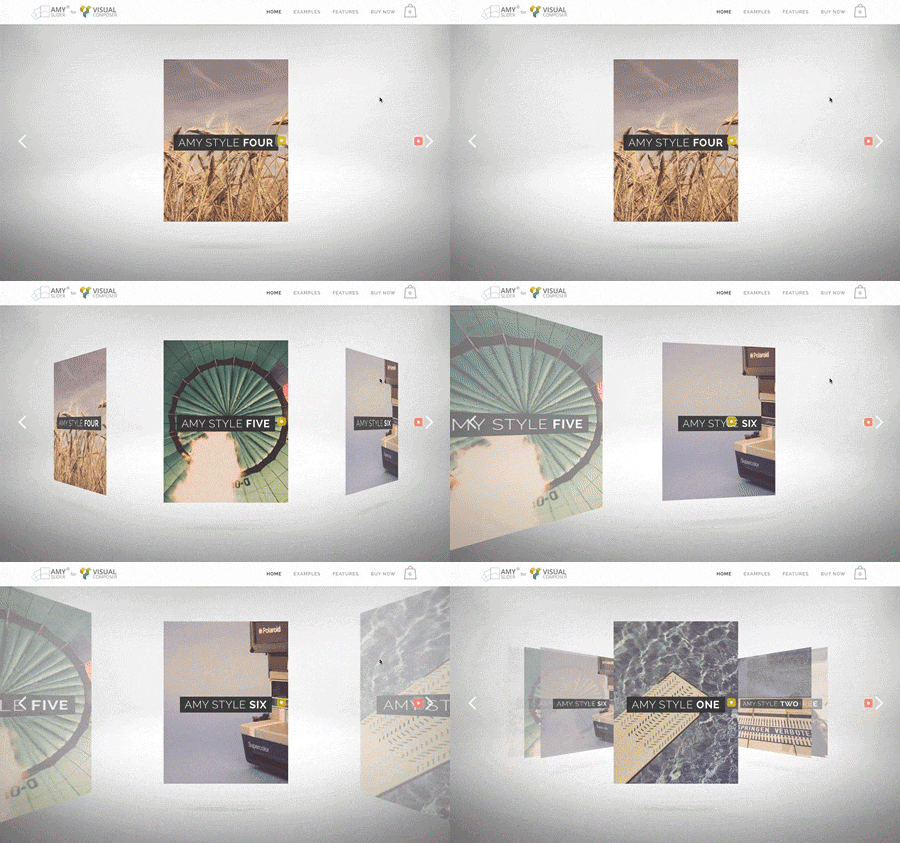 [/vc_column_text][vc_empty_space height=»120px»][/vc_column][vc_column width=»1/2″][vc_empty_space height=»80px»][ultimate_heading main_heading=»Un slider elegante y muy único, aplicable a todos los temas que usan Visual Composer.» main_heading_color=»#2d2d2d» sub_heading_color=»#ac37b2″ alignment=»left» spacer=»line_only» spacer_position=»middle» line_height=»2″ line_color=»#161616″ main_heading_font_size=»desktop:70px;tablet:60px;tablet_portrait:60px;mobile_landscape:40px;mobile:40px;» sub_heading_font_size=»desktop:24px;» main_heading_line_height=»desktop:70px;tablet:60px;tablet_portrait:60px;mobile_landscape:40px;mobile:40px;» sub_heading_style=»font-weight:bold;» sub_heading_margin=»margin-bottom:10px;» main_heading_margin=»margin-bottom:10px;» line_width=»60″ spacer_margin=»margin-top:20px;margin-bottom:20px;» main_heading_style=»font-weight:bold;»]AMY SLIDER[/ultimate_heading][ultimate_heading main_heading_color=»#2d2d2d» sub_heading_color=»#666666″ alignment=»left» main_heading_font_size=»desktop:45px;» sub_heading_font_size=»desktop:20px;» sub_heading_margin=»margin-top:10px;»]No sólo hará que un estallido de contenido, sino que también ayudará a alcanzar más fácilmente sus objetivos de ventas WooCommerce mostrando tu tienda de artículos de una manera única y atractiva.
Este es sin duda un producto para ti, si tú está buscando agregar creatividad a tú tema.[/ultimate_heading][vc_empty_space height=»120px»][/vc_column][/vc_row][vc_row bg_type=»bg_color» seperator_enable=»seperator_enable_value» seperator_type=»xlarge_triangle_right_seperator» seperator_svg_height=»100″ seperator_shape_background=»#ffffff» bgcolor=»#ffffff» bg_color_value=»#f7f7f7″][vc_column animation=»fadeInRight» width=»1/2″][vc_empty_space height=»150px»][ultimate_heading main_heading=»Una forma sencilla de crear Formularios para Visual composer» main_heading_color=»#2d2d2d» sub_heading_color=»#ac37b2″ alignment=»left» spacer=»line_only» spacer_position=»middle» line_height=»2″ line_color=»#161616″ main_heading_font_size=»desktop:70px;tablet:60px;tablet_portrait:60px;mobile_landscape:40px;mobile:40px;» sub_heading_font_size=»desktop:24px;» main_heading_line_height=»desktop:70px;tablet:60px;tablet_portrait:60px;mobile_landscape:40px;mobile:40px;» sub_heading_style=»font-weight:bold;» sub_heading_margin=»margin-bottom:10px;» main_heading_margin=»margin-bottom:10px;» line_width=»60″ spacer_margin=»margin-top:10px;margin-bottom:10px;» main_heading_style=»font-weight:bold;»]EASY FORMS[/ultimate_heading][ultimate_heading main_heading_color=»#2d2d2d» sub_heading_color=»#3f3f3f» alignment=»left» main_heading_font_size=»desktop:45px;» sub_heading_font_size=»desktop:20px;»]Funciona con cualquier tema además como usa el sistema ShortCode lo puedes usar en otro tema y no es necesario tener el visual composer instalado
Permite hacer que los datos que se envían por el formulario se queden grabados en una base de datos además de enviarlos al mail del cliente[/ultimate_heading][vc_empty_space height=»150px»][/vc_column][vc_column animation=»fadeInLeft» width=»1/2″][vc_empty_space height=»150px»][vc_single_image image=»9809″ img_size=»full»][vc_empty_space height=»150px»][/vc_column][/vc_row][vc_row bg_type=»bg_color» seperator_enable=»seperator_enable_value» seperator_type=»xlarge_triangle_left_seperator» seperator_position=»bottom_seperator» seperator_svg_height=»100″ seperator_shape_background=»#ffffff» bgcolor=»#ffffff» bg_color_value=»#f9f9f9″][vc_column animation=»fadeInRight» width=»1/2″][vc_empty_space height=»120px»][vc_single_image image=»9811″ img_size=»full»][vc_empty_space height=»120px»][/vc_column][vc_column animation=»fadeInLeft» width=»1/2″][vc_empty_space height=»120px»][ultimate_heading main_heading=»Alguna vez ha querido exportar tus plantillas diseñadas a otro sitio?» main_heading_color=»#2d2d2d» sub_heading_color=»#ff1151″ alignment=»left» spacer=»line_only» spacer_position=»middle» line_height=»2″ line_color=»#161616″ main_heading_font_size=»desktop:70px;tablet:60px;tablet_portrait:60px;mobile_landscape:40px;mobile:40px;» sub_heading_font_size=»desktop:24px;» main_heading_line_height=»desktop:70px;tablet:60px;tablet_portrait:60px;mobile_landscape:40px;mobile:40px;» sub_heading_style=»font-weight:bold;» sub_heading_margin=»margin-bottom:10px;» main_heading_margin=»margin-bottom:10px;» line_width=»60″ spacer_margin=»margin-top:10px;margin-bottom:10px;» main_heading_style=»font-weight:bold;»]TEMPLATERA[/ultimate_heading][ultimate_heading main_heading_color=»#2d2d2d» sub_heading_color=»#474747″ alignment=»left» main_heading_font_size=»desktop:45px;» sub_heading_font_size=»desktop:20px;»]Al instalar Templatera, un nuevo elemento de contenido «Templatera» aparecerá automáticamente en el menú de Visual Composer. El nuevo elemento de contenido «Templatera» le permite colocar las plantillas pre-construidas como una bloques independientes en sus páginas.
Las plantillas de importación / exportación permiten llevarte tus diseños o maquetaciones de un WordPress a otro.[/ultimate_heading][vc_empty_space height=»120px»][/vc_column][/vc_row][vc_row bg_type=»bg_color» bgcolor=»#ffffff» bg_color_value=»#ffffff»][vc_column animation=»fadeInRight» width=»1/2″][vc_empty_space height=»120px»][ultimate_heading main_heading=»Efecto de pasar el cursor sobre objetos y que muestren información» main_heading_color=»#2d2d2d» sub_heading_color=»#ff1151″ alignment=»left» spacer=»line_only» spacer_position=»middle» line_height=»2″ line_color=»#161616″ main_heading_font_size=»desktop:70px;tablet:60px;tablet_portrait:60px;mobile_landscape:40px;mobile:40px;» sub_heading_font_size=»desktop:24px;» main_heading_line_height=»desktop:70px;tablet:60px;tablet_portrait:60px;mobile_landscape:40px;mobile:40px;» sub_heading_style=»font-weight:bold;» sub_heading_margin=»margin-bottom:10px;» main_heading_margin=»margin-bottom:10px;» line_width=»60″ spacer_margin=»margin-top:10px;margin-bottom:10px;» main_heading_style=»font-weight:bold;»]IHOVER[/ultimate_heading][ultimate_heading main_heading_color=»#2d2d2d» sub_heading_color=»#444444″ alignment=»left» main_heading_font_size=»desktop:45px;» sub_heading_font_size=»desktop:20px;»]Una manera de hacer que nuestra web tenga un contenido más visual e interactivo usando un plugin de complemento para Visual Composer[/ultimate_heading][vc_empty_space height=»120px»][/vc_column][vc_column animation=»fadeInLeft» width=»1/2″][vc_empty_space height=»120px»][vc_row_inner][vc_column_inner width=»1/2″][ult_ihover thumb_height_width=»200″ gutter_width=»20″][ult_ihover_item title=»Jerzy Raczy» thumb_img=»9537|https://www.cursoswordpressmadrid.com/wp-content/uploads/2016/06/jerzy_visualwordpress-1.jpg» hover_effect=»effect12″ title_responsive_font_size=»desktop:22px;» title_responsive_line_height=»desktop:28px;» desc_responsive_font_size=»desktop:12px;» desc_responsive_line_height=»desktop:18px;»]Formador[/ult_ihover_item][/ult_ihover][/vc_column_inner][vc_column_inner width=»1/2″][ult_ihover thumb_height_width=»200″ gutter_width=»20″][ult_ihover_item title=»Tommy Raczy» thumb_img=»9545|https://www.cursoswordpressmadrid.com/wp-content/uploads/2016/06/tommy_visual-e1465985677701.jpg» hover_effect=»effect12″ title_responsive_font_size=»desktop:22px;» title_responsive_line_height=»desktop:28px;» desc_responsive_font_size=»desktop:12px;» desc_responsive_line_height=»desktop:18px;»]Formador[/ult_ihover_item][/ult_ihover][/vc_column_inner][/vc_row_inner][vc_empty_space height=»120px»][/vc_column][/vc_row][vc_row bg_type=»bg_color» seperator_enable=»seperator_enable_value» seperator_type=»xlarge_triangle_right_seperator» seperator_position=»top_bottom_seperator» seperator_svg_height=»100″ seperator_shape_background=»#ffffff» bgcolor=»#ffffff» bg_color_value=»#f9f9f9″][vc_column animation=»fadeInRight» width=»1/2″][vc_empty_space height=»120px»][vc_column_text] [/vc_column_text][/vc_column][vc_column animation=»fadeInLeft» width=»1/2″][vc_empty_space height=»120px»][ultimate_heading main_heading=»Tu sitio web en varios idiomas WPML» main_heading_color=»#2d2d2d» sub_heading_color=»#ff1151″ alignment=»left» spacer=»line_only» spacer_position=»middle» line_height=»2″ line_color=»#161616″ main_heading_font_size=»desktop:70px;tablet:60px;tablet_portrait:60px;mobile_landscape:40px;mobile:40px;» sub_heading_font_size=»desktop:24px;» main_heading_line_height=»desktop:70px;tablet:60px;tablet_portrait:60px;mobile_landscape:40px;mobile:40px;» sub_heading_style=»font-weight:bold;» sub_heading_margin=»margin-bottom:10px;» main_heading_margin=»margin-bottom:10px;» line_width=»60″ spacer_margin=»margin-top:10px;margin-bottom:10px;» main_heading_style=»font-weight:bold;»]Crea un sitio web multi idioma optimizado para SEO[/ultimate_heading][ultimate_heading main_heading_color=»#2d2d2d» sub_heading_color=»#3a3a3a» alignment=»left» main_heading_font_size=»desktop:45px;» sub_heading_font_size=»desktop:20px;»]Usaremos el plugin pro WPML para el desarrollo de una web en varios idiomas, ademas de traducir las url para cada idioma, enseñaremos como se hace para comercio electrónico y un blog profesional, es IMPORTANTE si queremos posicionarnos en google que cada pagina tenga su propia url por país.[/ultimate_heading][vc_empty_space height=»120px»][/vc_column][/vc_row][vc_row bg_type=»bg_color» seperator_enable=»seperator_enable_value» seperator_type=»xlarge_triangle_right_seperator» seperator_svg_height=»100″ seperator_shape_background=»#ffffff» bgcolor=»#ffffff» bg_color_value=»#ffffff»][vc_column animation=»fadeInRight» width=»1/2″][vc_empty_space height=»120px»][ultimate_heading main_heading=»Crea niveles o membresías para tu clientes con contenido exclusivo» main_heading_color=»#2d2d2d» sub_heading_color=»#ff1151″ alignment=»left» spacer=»line_only» spacer_position=»middle» line_height=»2″ line_color=»#161616″ main_heading_font_size=»desktop:70px;tablet:60px;tablet_portrait:60px;mobile_landscape:40px;mobile:40px;» sub_heading_font_size=»desktop:24px;» main_heading_line_height=»desktop:70px;tablet:60px;tablet_portrait:60px;mobile_landscape:40px;mobile:40px;» sub_heading_style=»font-weight:bold;» sub_heading_margin=»margin-bottom:10px;» main_heading_margin=»margin-bottom:10px;» line_width=»60″ spacer_margin=»margin-top:10px;margin-bottom:10px;» main_heading_style=»font-weight:bold;»]Ultimate MEMBERSHIP PRO[/ultimate_heading][ultimate_heading main_heading_color=»#2d2d2d» sub_heading_color=»#3a3a3a» alignment=»left» main_heading_font_size=»desktop:45px;» sub_heading_font_size=»desktop:20px;»]Ultimate Member Pro es el más nuevo y mejor plugin de WordPress afiliación que le permiten crear y trabajar con acceso exclusivo a varios niveles para los usuarios basados en simples paquetes gratis o paquetes pagados.
Protege tu: Páginas, productos, categorías, cualquier URL, secciones de contenido, imágenes, menús, cualquier cosa y establecer un redireccionamiento o reemplazar regla de contenido.[/ultimate_heading][vc_empty_space height=»120px»][vc_column_text]e[/vc_column_text][/vc_column][vc_column animation=»fadeInLeft» width=»1/2″][vc_empty_space height=»120px»][vc_single_image image=»9612″ img_size=»full»][vc_empty_space height=»120px»][/vc_column][/vc_row][vc_row padding=»sm-padding»][vc_column][ultimate_heading main_heading=»Lo que dicen los alumnos de este curso» main_heading_font_size=»desktop:70px;tablet:60px;tablet_portrait:60px;mobile_landscape:40px;mobile:40px;» main_heading_style=»font-weight:bold;» main_heading_line_height=»desktop:70px;tablet:60px;tablet_portrait:60px;mobile_landscape:40px;mobile:40px;»][/ultimate_heading][/vc_column][/vc_row][vc_row padding=»sm-padding»][vc_column width=»1/2″][vc_video link=»https://vimeo.com/190924284″][/vc_column][vc_column width=»1/2″][vc_video link=»https://vimeo.com/190836106″][/vc_column][/vc_row][vc_row padding=»sm-padding»][vc_column width=»1/2″][vc_video link=»https://vimeo.com/190708198″][/vc_column][vc_column width=»1/2″][vc_video link=»https://vimeo.com/191123348″][/vc_column][/vc_row][vc_row padding=»sm-padding»][vc_column width=»1/2″][vc_video link=»https://vimeo.com/191123782″][/vc_column][vc_column width=»1/2″][vc_video link=»https://vimeo.com/191125083″][/vc_column][/vc_row][vc_row][vc_column][vc_column_text][/vc_column_text][vc_empty_space height=»80″][/vc_column][/vc_row][vc_row background=»https://www.cursoswordpressmadrid.com/wp-content/uploads/2016/06/geometry2.png»][vc_column width=»1/3″][vc_column_text] [/vc_column_text][/vc_column][vc_column width=»2/3″][ultimate_heading main_heading=»¿Quieres que te avisemos en la próxima convocatoria?» alignment=»left» main_heading_font_size=»desktop:70px;tablet:60px;tablet_portrait:60px;mobile_landscape:40px;mobile:40px;» main_heading_style=»font-weight:bold;» main_heading_line_height=»desktop:70px;tablet:60px;tablet_portrait:60px;mobile_landscape:40px;mobile:40px;» main_heading_margin=»margin-bottom:60px;»][/ultimate_heading][contact-form-7 id=»9183″][/vc_column][/vc_row]
